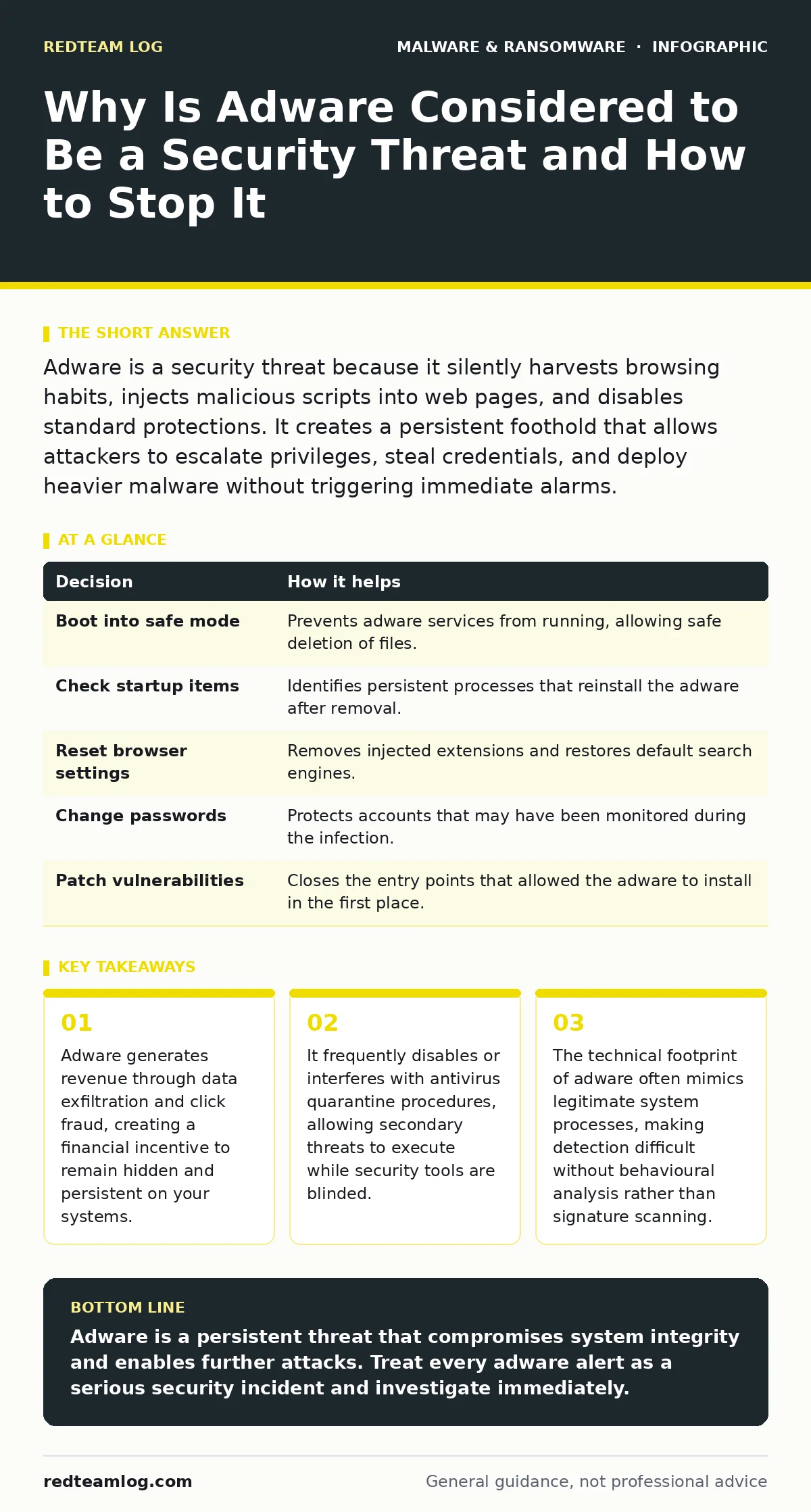
Adware is a security threat because it silently harvests browsing habits, injects malicious scripts into web pages, and disables standard protections. It creates a persistent foothold that allows attackers to escalate privileges, steal credentials, and deploy heavier malware without triggering immediate alarms.
Why Is Adware Considered to Be a Security Threat
Adware is considered a security threat because it operates as a persistent surveillance tool that degrades system integrity. Unlike simple pop-ups, modern adware installs background services that monitor keystrokes, track browsing history, and inject malicious code into otherwise safe websites. This constant data collection creates a detailed profile of your organisation’s digital habits. Attackers use this intelligence to craft targeted phishing campaigns or to identify high-value targets for ransomware. The presence of adware signals that your perimeter defences have already failed.
It indicates that a user clicked a deceptive link or downloaded a bundled installer. This initial breach allows the software to modify system settings, change default search engines, and bypass standard access controls. The threat is not just the annoyance of unwanted ads. It is the structural damage to your security posture. Adware turns every browser session into a potential data leak. It exposes internal network structures to external observers. You must treat adware as a serious intruder, not a minor nuisance.
The Hidden Costs of Ignoring Adware
Ignoring adware leads to a slow erosion of trust and system performance. The most immediate cost is reduced productivity. Systems run slower when adware consumes CPU and memory resources in the background. This degradation often goes unnoticed for weeks. Users complain about lagging applications or unresponsive browsers. IT teams blame hardware age or network congestion. They miss the root cause. The deeper cost is data loss. Adware logs every URL visited and every form filled out. This data is sold to third parties or used to refine attack vectors.
Your employees may unknowingly expose session tokens or internal IP addresses. This exposure makes lateral movement easier for subsequent attacks. The financial impact is indirect but significant. Remediation takes longer when adware has embedded itself deep into the system registry or startup folders. You spend more hours on cleanup than on prevention. The opportunity cost of lost work time adds up. Your organisation becomes a predictable target. Attackers know your systems are soft. They return with heavier payloads.
How Adware Enables Advanced Attacks
Adware acts as a gateway for more dangerous malware. It often disables security features to ensure its own survival. This creates a window of vulnerability. Attackers exploit this window to drop ransomware or install keyloggers. The adware itself may not encrypt files. It simply removes the barriers that would stop it. For example, it might turn off real-time scanning or block updates to your security software. This behaviour is similar to what is seen with stalkerware, which also relies on stealth and persistence. The difference is intent. Adware seeks profit through data and clicks.
Stalkerware seeks control. Both compromise system integrity. Adware also facilitates drive-by downloads. It redirects users to malicious sites that exploit browser vulnerabilities. These sites deliver payloads without any further interaction. The user thinks they are visiting a legitimate news site. They are actually executing a script. This script downloads additional tools. These tools can establish command and control channels. They can steal credentials. They can scan for other vulnerable devices. The adware is the initial vector. It opens the door. The real damage comes from what walks through it.
Detection Challenges and False Positives
Detecting adware is difficult because it mimics legitimate software. Many adware programs use valid digital signatures. They appear as trusted applications in your task manager. Traditional antivirus tools may flag them as low-priority threats. They might move the files to antivirus quarantine but leave the registry keys intact. This partial removal allows the adware to reinstall itself. You need behavioural analysis to catch these threats. Look for unusual network connections. Check for processes that consume high resources without a clear purpose.
Monitor for changes in browser settings. Adware often modifies proxy settings or DNS configurations. These changes redirect traffic through attacker-controlled servers. You must correlate events across different logs. A single alert is rarely enough. You need a pattern. Multiple failed login attempts combined with new browser extensions suggest a problem. Unusual outbound traffic to unknown domains is another sign. Do not rely on file hashes alone. Adware changes its code frequently to evade detection. Focus on behaviour. Focus on what the software does, not just what it is called.
Remediation Strategies That Actually Work
Removing adware requires more than just uninstalling the program. You must clean the environment. Start by booting into safe mode. This prevents the adware from loading its protective services. Then, check your startup items. Disable anything that looks suspicious. Verify the publisher of each entry. Use a dedicated removal tool if necessary. These tools are designed to find hidden components. They scan for leftover files and registry entries. After removal, reset your browser settings.
Clear your cache and cookies. Change your passwords. Assume that any credential entered while the adware was active is compromised. Update your operating system and applications. Patch the vulnerabilities that allowed the adware to install. Finally, educate your users. Teach them to read installation wizards carefully. Uncheck optional offers. These offers are often the source of the adware. Prevention is cheaper than remediation. Make security part of your daily routine.
| Decision | How it helps |
|---|---|
| Boot into safe mode | Prevents adware services from running, allowing safe deletion of files. |
| Check startup items | Identifies persistent processes that reinstall the adware after removal. |
| Reset browser settings | Removes injected extensions and restores default search engines. |
| Change passwords | Protects accounts that may have been monitored during the infection. |
| Patch vulnerabilities | Closes the entry points that allowed the adware to install in the first place. |
Preventing Future Infections
Prevention starts with user awareness. Most adware installs through social engineering. Users click "Accept" without reading. They download software from untrusted sources. They bundle unwanted programs with legitimate ones. You must train your users to pause before clicking. Teach them to verify the source of every download. Use application whitelisting where possible. This restricts which programs can run on your systems. It blocks unknown executables. Implement strict firewall rules.
Block outbound traffic to known advertising networks. This cuts off the adware’s revenue stream. It makes the infection useless to the attacker. Regularly audit your installed applications. Remove anything you do not recognise. Keep your security software updated. Ensure it can detect the latest variants. Monitor your network for anomalies. Look for spikes in traffic or connections to unusual ports. Early detection is key. The sooner you find adware, the less damage it can do. Treat every installation as a potential risk. Verify before you trust.
The Role of Browser Extensions
Browser extensions are a common vector for adware. They have broad permissions. They can read every page you visit. They can modify page content. This makes them powerful tools for attackers. Many adware programs install extensions to track activity. These extensions are often signed by legitimate developers. They pass initial security checks. You must review your extensions regularly. Remove anything you do not use. Check the permissions each extension requests.
If a simple calculator app needs access to your browsing history, that is a red flag. Be cautious with extensions from third-party stores. They are less strictly vetted. Stick to official stores. Even then, read the reviews. Look for complaints about privacy or performance. A popular extension is not necessarily safe. It just has more users to exploit. Treat extensions like native applications. They have the same potential for harm. Manage them with the same care.
Key takeaways
- Adware generates revenue through data exfiltration and click fraud, creating a financial incentive to remain hidden and persistent on your systems.
- It frequently disables or interferes with antivirus quarantine procedures, allowing secondary threats to execute while security tools are blinded.
- The technical footprint of adware often mimics legitimate system processes, making detection difficult without behavioural analysis rather than signature scanning.
Adware is a persistent threat that compromises system integrity and enables further attacks. Treat every adware alert as a serious security incident and investigate immediately.
Frequently asked questions
Can adware steal my passwords?
Yes, adware can install keyloggers or browser extensions that capture credentials as you type them. It monitors your activity and sends the data to external servers.
Is adware the same as a virus?
No, adware is designed to display ads and collect data. A virus replicates itself and damages files. However, adware can facilitate the installation of viruses by disabling security tools.
How do I know if I have adware?
Look for sudden changes in your browser homepage, new toolbars, or slower system performance. Unexplained pop-ups and redirects are also strong indicators of an infection.
Does antivirus software remove adware?
Most antivirus programs can detect and remove common adware. However, some sophisticated variants may require dedicated removal tools or manual cleanup to ensure complete eradication.
How this guide was produced: written by the RedTeam Log editorial team with AI assistance, checked against the public references listed below, and reviewed when the facts change. See our editorial policy or report an error.