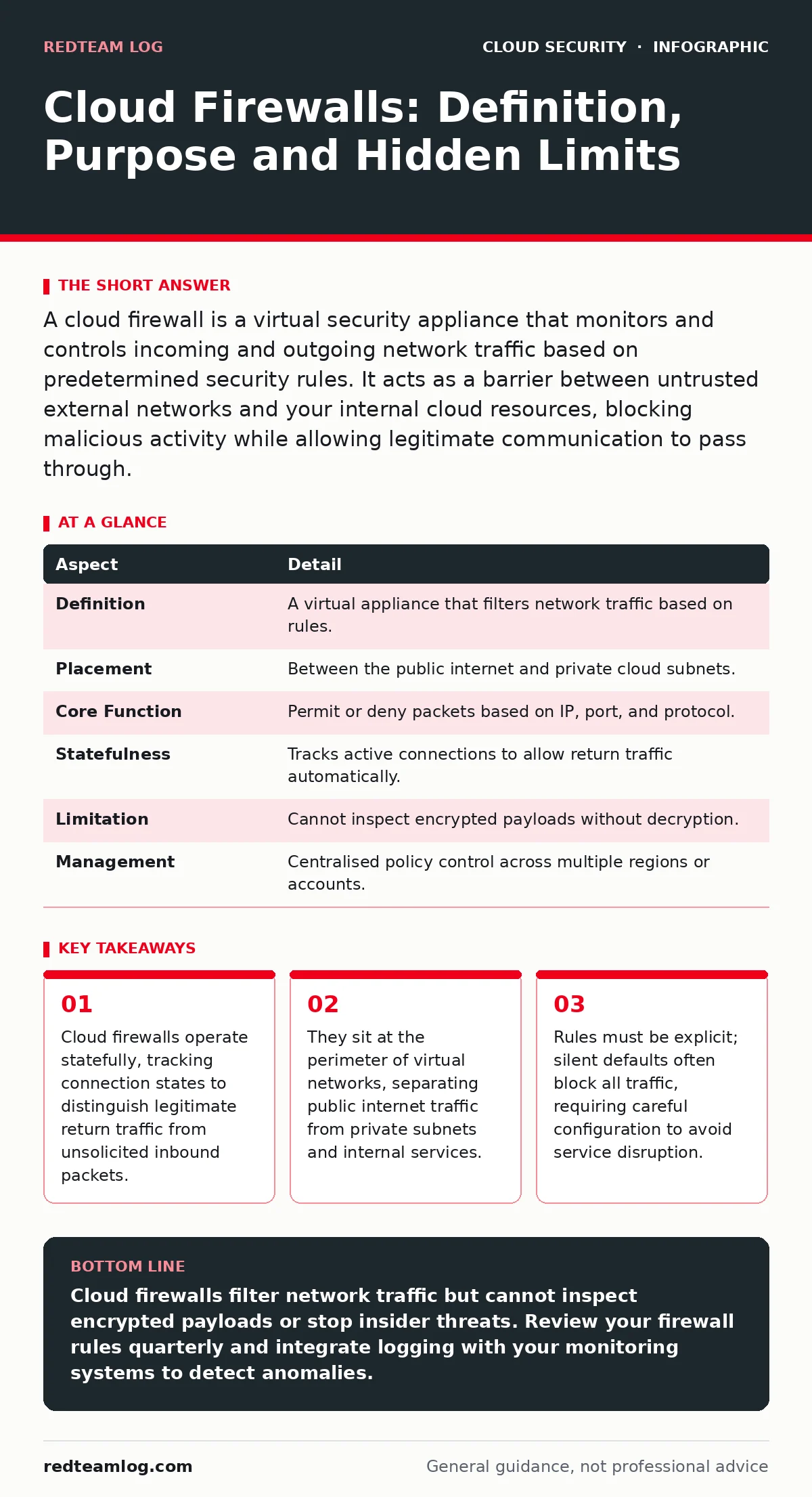
A cloud firewall is a virtual security appliance that monitors and controls incoming and outgoing network traffic based on predetermined security rules. It acts as a barrier between untrusted external networks and your internal cloud resources, blocking malicious activity while allowing legitimate communication to pass through.
The Digital Toll Booth Analogy
Imagine a busy highway interchange where every vehicle must stop at a checkpoint before entering a secure industrial estate. The guard checks the licence plate against a whitelist and verifies that the cargo matches the declared manifest. If a truck claims to carry office supplies but the weight sensors indicate heavy machinery, the guard denies entry.
This checkpoint is the firewall. It does not inspect the contents of every box inside the truck, nor does it know if the driver is hostile. It simply enforces the rule that only authorised vehicles with declared cargo may enter. In the cloud, this checkpoint is software-defined rather than hardware-based, allowing it to scale instantly with traffic volume.
At a Glance
| Aspect | Detail |
|---|---|
| Definition | A virtual appliance that filters network traffic based on rules. |
| Placement | Between the public internet and private cloud subnets. |
| Core Function | Permit or deny packets based on IP, port, and protocol. |
| Statefulness | Tracks active connections to allow return traffic automatically. |
| Limitation | Cannot inspect encrypted payloads without decryption. |
| Management | Centralised policy control across multiple regions or accounts. |
The Problem It Solves
Without a firewall, your cloud resources are directly exposed to the global internet. Every server, database, and application endpoint is accessible to anyone who knows the address. Attackers use automated scanners to probe for open ports and vulnerable services. A firewall introduces a layer of obscurity and restriction. It ensures that only necessary ports are open to the world. For example, a web server might only need port 443 for HTTPS traffic. All other ports remain closed to external probes. This reduces the attack surface significantly. It also prevents lateral movement from compromised external assets into your internal network segments.
Main Components of a Cloud Firewall
A cloud firewall consists of rules, logging, and state tracking. Rules are the instructions that tell the firewall what to allow or deny. Each rule typically specifies a source, destination, protocol, and port. You must order these rules carefully because the firewall processes them sequentially. The first matching rule determines the action. Logging records every connection attempt, whether allowed or denied.
This data is vital for forensic analysis and detecting unusual patterns. State tracking maintains a table of active connections. When a server inside your network initiates a connection to an external API, the firewall remembers this. When the response returns, the firewall allows it through without requiring a separate inbound rule. This mechanism simplifies configuration and reduces the risk of misconfigured inbound permissions.
Where It Fits in Your Defence Stack
Firewalls are not a standalone solution. They work in conjunction with other security controls. They sit at the network layer, filtering traffic before it reaches your applications. However, they do not replace application-level protections. Web application firewalls, which inspect HTTP traffic for specific attack patterns like SQL injection, operate at a higher layer. Identity and access management controls who can create or modify firewall rules.
Without strict controls on cloud entitlements, an attacker with compromised credentials could disable the firewall or add permissive rules. Furthermore, firewalls do not protect data at rest. For that, you need bring your own key encryption to ensure that even if storage is accessed, the data remains unreadable without the correct keys.
See also: Port scanning meaning: how attackers map your network before striking · Beaconing Detected: Step-by-Step Response and Recovery Plan
What People Usually Get Wrong
Many organisations treat the cloud firewall as a set-and-forget appliance. They configure initial rules and then neglect them. Over time, rules become outdated as applications change. Old rules that allowed access to decommissioned services remain active, creating unnecessary risk. Another common mistake is relying on the firewall to stop encrypted attacks. Most cloud firewalls operate at Layer 3 and 4 of the OSI model. They inspect IP headers and port numbers but not the payload.
If an attacker sends malware inside an encrypted HTTPS stream, the firewall sees only valid TLS handshake packets. It cannot detect the malicious content. To address this, you must implement decryption at a proxy layer, which introduces latency and privacy considerations. Finally, teams often forget that firewalls do not protect against insider threats. If a user inside the network initiates a malicious connection, the firewall may allow it because the source is trusted.
Beyond the Firewall
To build a resilient security posture, you must look beyond network filtering. Cloud logging and monitoring provides visibility into firewall activity. You can set alerts for unusual traffic volumes or connections to known malicious IPs. Workload identity ensures that applications authenticate themselves securely, reducing the risk of credential theft.
If an application’s identity is compromised, the firewall rules may not prevent the attacker from accessing internal resources. Cloud penetration testing helps identify misconfigurations in your firewall rules before attackers do. Regular testing reveals gaps such as overly permissive rules or missing logging configurations. Additionally, secrets in source code can expose credentials that bypass network controls. If an attacker obtains a valid API key, they can interact with your services directly, rendering firewall rules less effective.
Integrating with Backup Strategies
Firewalls protect against external attacks, but they do not prevent data loss from internal errors or ransomware. If an attacker bypasses the firewall and encrypts your data, you need a way to recover. Cloud backup strategies must include immutable copies of critical data. These backups should be stored in a separate environment with strict access controls. The firewall should block direct access to backup storage from the production network. This separation ensures that even if the production environment is compromised, the backups remain safe. Regularly test your backup restoration process to ensure it works when needed.
Key takeaways
- Cloud firewalls operate statefully, tracking connection states to distinguish legitimate return traffic from unsolicited inbound packets.
- They sit at the perimeter of virtual networks, separating public internet traffic from private subnets and internal services.
- Rules must be explicit; silent defaults often block all traffic, requiring careful configuration to avoid service disruption.
- Firewalls do not inspect encrypted traffic without decryption, leaving a blind spot for malware hidden within TLS tunnels.
Cloud firewalls filter network traffic but cannot inspect encrypted payloads or stop insider threats. Review your firewall rules quarterly and integrate logging with your monitoring systems to detect anomalies.
Frequently asked questions
Do cloud firewalls protect against DDoS attacks?
They can mitigate small-scale attacks by rate-limiting traffic, but large distributed attacks require dedicated DDoS protection services that absorb traffic at the edge.
Can I use a cloud firewall for on-premises servers?
Some providers offer hybrid capabilities that extend firewall rules to on-premises environments, but performance depends on the connectivity between the cloud and local data centre.
How do I prevent firewall rule sprawl?
Implement a regular review process to remove unused rules. Use tagging to associate rules with specific applications or teams, making it easier to identify and remove obsolete configurations.
Are cloud firewalls stateful or stateless?
Most modern cloud firewalls are stateful, meaning they track the state of active connections and automatically allow return traffic. Stateless firewalls treat each packet independently, requiring explicit rules for both directions.
How this guide was produced: written by the RedTeam Log editorial team with AI assistance, checked against the public references listed below, and reviewed when the facts change. See our editorial policy or report an error.