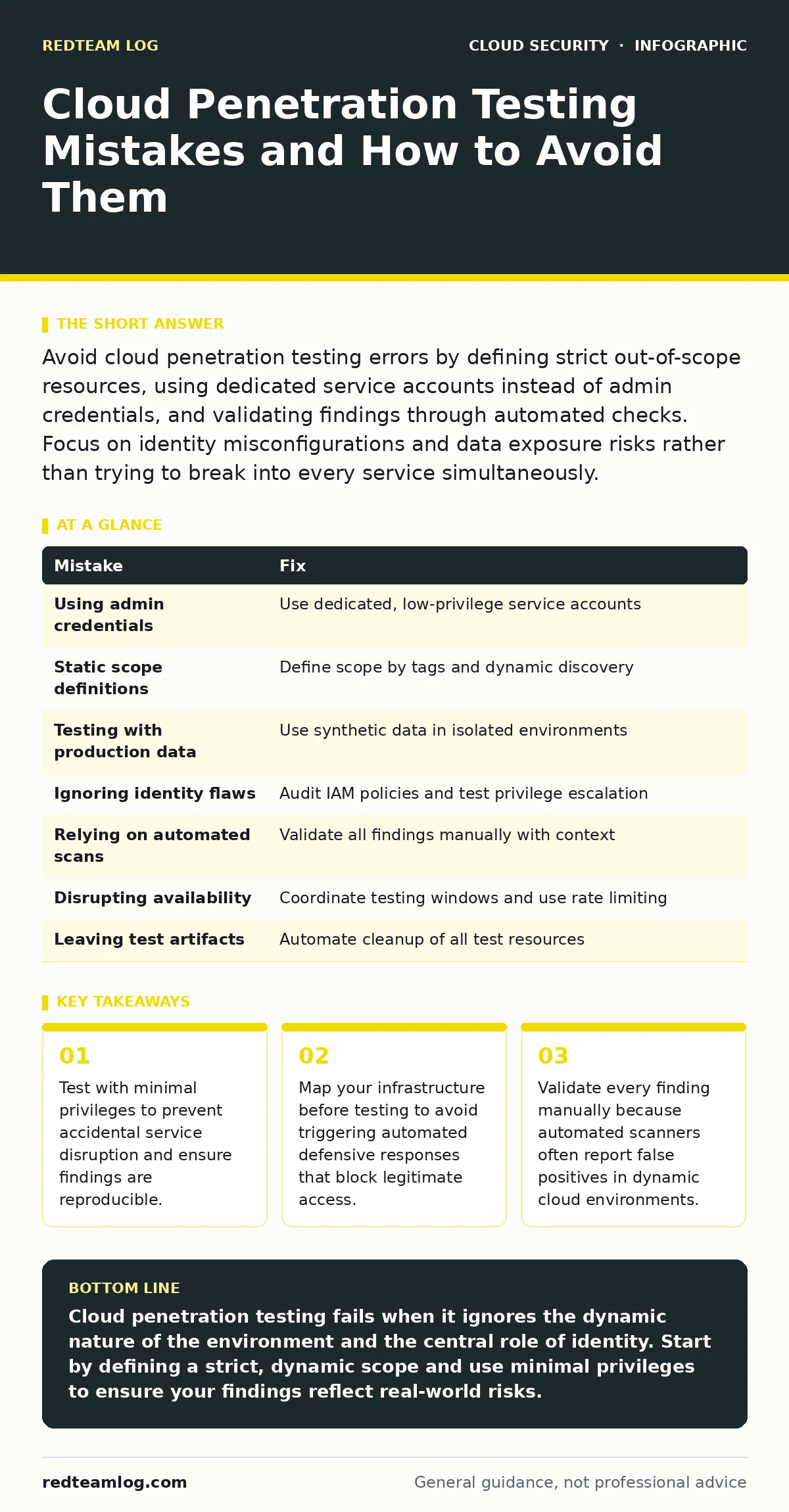
Avoid cloud penetration testing errors by defining strict out-of-scope resources, using dedicated service accounts instead of admin credentials, and validating findings through automated checks. Focus on identity misconfigurations and data exposure risks rather than trying to break into every service simultaneously.
Mistake 1: Testing with full administrative credentials
Using root or administrator accounts during an engagement gives you a distorted view of your security posture. You bypass many controls that would stop an attacker with limited access, creating a false sense of security. This approach also increases the risk of accidental damage to production systems.
Why it hurts:
Findings derived from admin access are often irrelevant to real-world threat models. Attackers rarely start with full control; they exploit specific misconfigurations to escalate privileges. By testing as an administrator, you miss the subtle permission flaws that allow lateral movement. You also risk triggering automated locks on critical accounts.
The fix:
Create a dedicated service account with the lowest possible privileges for the test. This account should mirror the permissions of a standard user or a specific application role. Document every action taken by this account to distinguish test traffic from potential breaches. This method ensures that any vulnerability found is exploitable by a realistic threat actor.
Mistake 2: Ignoring the scope of dynamic resources
Cloud environments are ephemeral, with instances starting and stopping automatically. Treating the cloud like a static data centre leads to testing gaps and wasted effort. You may target resources that no longer exist or miss newly deployed services that hold sensitive data.
Why it hurts:
Static scope lists become outdated within minutes in auto-scaling environments. You might waste time testing decommissioned servers while missing critical vulnerabilities in new deployments. This disconnect leads to incomplete coverage and gives you confidence in areas that are no longer relevant. It also increases the chance of testing production workloads that should remain untouched.
The fix:
Define scope by resource tags and identity policies rather than fixed IP addresses or instance IDs. Use infrastructure as code to identify which environments are eligible for testing. Integrate your testing framework with your cloud management console to dynamically discover in-scope resources. This approach ensures you test the current state of your infrastructure, not a snapshot from days ago.
Mistake 3: Failing to isolate test data from production
Mixing test payloads with live customer data creates legal and operational hazards. Even minor data corruption can cause significant business disruption and breach compliance requirements. You risk exposing sensitive information during the testing process itself.
Why it hurts:
Testing against production data can lead to accidental data exfiltration or modification. This violates privacy regulations and erodes trust with customers. It also makes it difficult to distinguish between normal application behaviour and anomalies caused by the test. You may trigger alert fatigue by flooding security teams with false positives from test activities.
The fix:
Use synthetic data that mimics the structure and volume of production data without containing any real information. Ensure that test environments are network-isolated from production where possible. Implement strict data handling policies for all test artifacts. This separation allows you to validate security controls without risking live business operations.
Mistake 4: Overlooking identity and access management flaws
Many testers focus on network vulnerabilities while ignoring the cloud’s primary defence mechanism: identity. Misconfigured roles and policies are the most common entry points for attackers. Ignoring these leads to a superficial assessment that misses the most likely attack vectors.
Why it hurts:
Identity misconfigurations allow attackers to assume roles they should not have. This can lead to full account takeover without ever exploiting a software bug. Traditional network scans will not detect these logic flaws. You may report a secure network while the underlying permissions allow unrestricted access to sensitive resources.
The fix:
Audit all identity and access management policies before starting technical testing. Look for overly broad permissions and unused roles. Reference a Cloud Controls Matrix to ensure you are checking against established security standards. Test privilege escalation paths by attempting to assume higher-level roles with minimal initial access. This focus reveals the true weakest link in your cloud security.
Mistake 5: Assuming automated scans are sufficient
Automated tools are efficient but lack context. They often report theoretical vulnerabilities that are not exploitable in your specific environment. Relying solely on tools misses logic flaws and business logic errors that only human analysis can find.
Why it hurts:
False positives waste time and dilute the impact of your report. False negatives leave critical vulnerabilities undetected. Tools cannot understand the business context of an application, such as which data is truly sensitive. You may miss complex attack chains that require multiple steps across different services.
The fix:
Use automated scans for initial discovery, but validate every finding manually. Confirm that the vulnerability is exploitable and assess its real-world impact. Combine tool output with manual review of cloud firewalls and security groups. This hybrid approach balances speed with accuracy, ensuring you report only actionable and relevant issues.
See also: Cloud Guardrails: 8 FAQs on Policy Enforcement and Prevention · Confidential Computing: 6 Misconceptions That Compromise Security
Mistake 6: Neglecting the impact on availability
Aggressive testing can disrupt services if not carefully controlled. Cloud providers have rate limits and automated protections that may block your IP or terminate instances. Uncontrolled testing can cause denial of service conditions, affecting legitimate users.
Why it hurts:
Service disruption damages your reputation and may violate service level agreements. Automated defensive systems may interpret your test traffic as a real attack, leading to IP blocks. This makes it difficult to continue the assessment and can lock you out of the environment entirely. You risk causing more harm than the vulnerability you are trying to find.
The fix:
Coordinate with your cloud provider and internal teams to establish safe testing windows. Use rate limiting in your testing tools to mimic normal traffic patterns. Monitor system performance during testing to detect any negative impact early. Immutable infrastructure practices can help you quickly restore services if a test causes unexpected issues.
Mistake 7: Leaving test artifacts in place
Test accounts, security groups, and temporary files often remain after the engagement ends. These artifacts create new vulnerabilities and clutter your environment. They can be exploited by attackers who discover the leftover access points.
Why it hurts:
Residual test resources expand your attack surface unnecessarily. They may have overly permissive settings that were required for the test but are not needed for production. This leads to configuration drift and security debt. You may inadvertently leave the door open for future attacks.
The fix:
Document every resource created during the test and schedule its immediate removal. Use infrastructure as code to automate the cleanup process. Verify that all test accounts are disabled and temporary security rules are removed. This ensures your environment returns to its secure baseline state after the assessment.
| Mistake | Fix |
|---|---|
| Using admin credentials | Use dedicated, low-privilege service accounts |
| Static scope definitions | Define scope by tags and dynamic discovery |
| Testing with production data | Use synthetic data in isolated environments |
| Ignoring identity flaws | Audit IAM policies and test privilege escalation |
| Relying on automated scans | Validate all findings manually with context |
| Disrupting availability | Coordinate testing windows and use rate limiting |
| Leaving test artifacts | Automate cleanup of all test resources |
Key takeaways
- Test with minimal privileges to prevent accidental service disruption and ensure findings are reproducible.
- Map your infrastructure before testing to avoid triggering automated defensive responses that block legitimate access.
- Validate every finding manually because automated scanners often report false positives in dynamic cloud environments.
Cloud penetration testing fails when it ignores the dynamic nature of the environment and the central role of identity. Start by defining a strict, dynamic scope and use minimal privileges to ensure your findings reflect real-world risks.
Frequently asked questions
Can I use cloud penetration testing to find secrets in source code?
No, penetration testing focuses on runtime security and configuration. Secrets in source code should be detected during the development phase using static analysis tools before deployment.
How do I handle insecure cloud APIs during testing?
Identify public-facing APIs and test for authentication bypasses and data exposure. Ensure that all API endpoints require valid authentication and authorisation checks.
Should I test container image scanning as part of penetration testing?
Container image scanning is a preventive measure, not a penetration testing activity. However, you can test for vulnerabilities in running containers that were missed during the scanning phase.
How does bring your own key encryption affect testing?
It adds complexity to data access tests. You must ensure that test accounts have the necessary permissions to use encryption keys without compromising their security.
How this guide was produced: written by the RedTeam Log editorial team with AI assistance, checked against the public references listed below, and reviewed when the facts change. See our editorial policy or report an error.