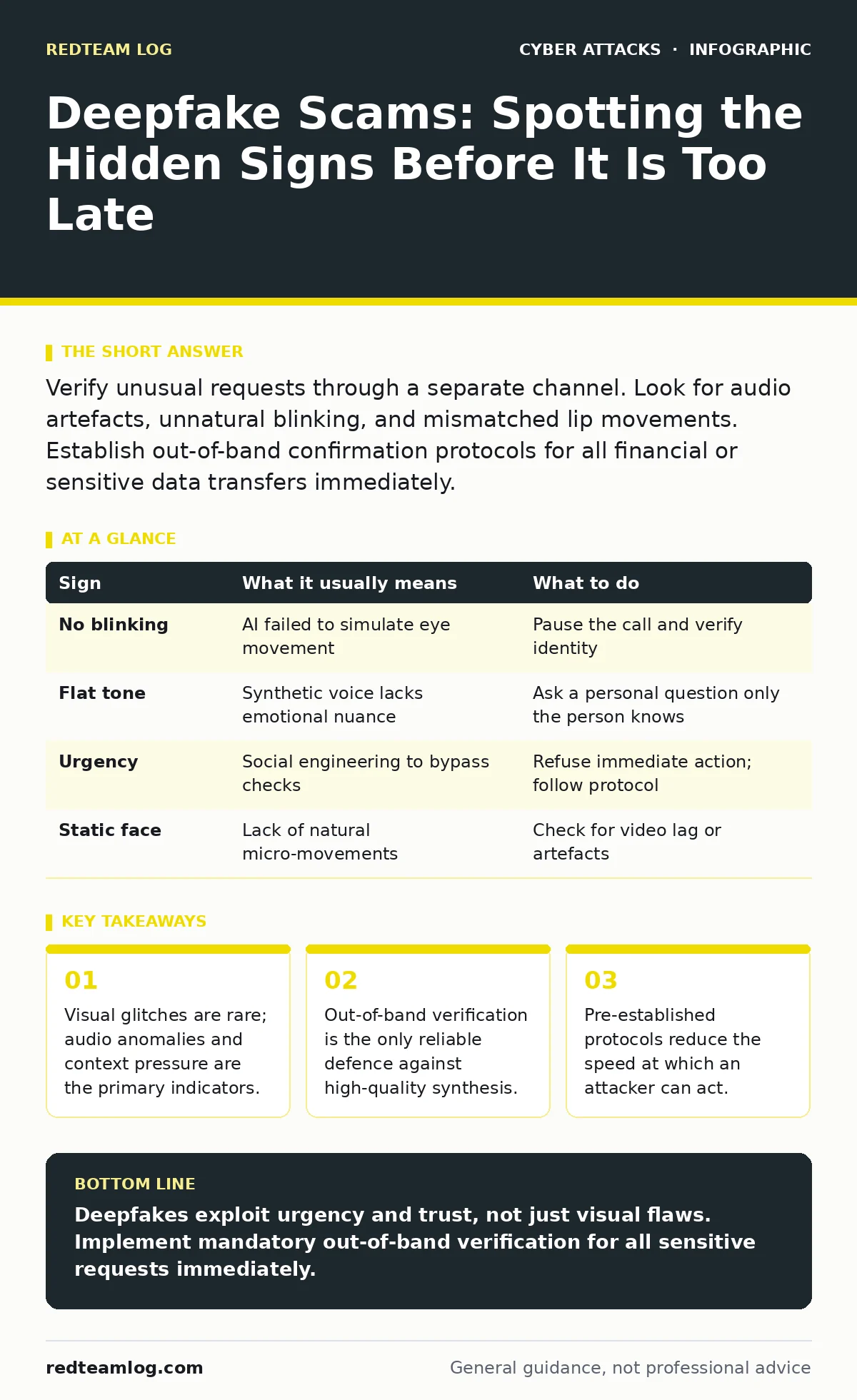
Verify unusual requests through a separate channel. Look for audio artefacts, unnatural blinking, and mismatched lip movements. Establish out-of-band confirmation protocols for all financial or sensitive data transfers immediately.
The Illusion of Perfection
Deepfakes use artificial intelligence to superimpose a person’s likeness onto a different source. Early generations of this technology produced obvious errors. You might have noticed a face sliding off the skull or hands merging into a single mass. Modern tools have moved past these clumsy mistakes. The result is often indistinguishable from reality to the untrained eye.
The danger lies in your expectation of imperfection. You wait for a glitch to confirm the fraud. The attacker knows this. They design the content to look perfect while hiding the truth in the timing and tone. Trusting your eyes alone is no longer a viable security strategy. You must look at how the media behaves, not just how it looks.
First Signs: The Visual Traps
The first signs people notice usually involve the eyes. Human eyes blink in irregular patterns. AI models often struggle to replicate this randomness. You may see a subject who stares without blinking for an unnatural duration. Alternatively, the blinks might be too frequent or perfectly timed.
Lip synchronisation is another common failure point. The mouth moves to match the audio, but the timing is slightly off. The corners of the mouth may not move naturally. The jaw might remain rigid while the lips articulate words. These are mechanical errors. They happen because the software is mapping audio to video, not simulating muscle movement.
Hidden Signs: The Audio Trap
Audio deepfakes are harder to spot than video. The human ear is less critical of minor inconsistencies than the eye. Attackers often focus here because it is easier to bypass. Listen for a flat emotional tone. The voice may sound perfect phonetically, but it lacks the micro-variations of stress or breath.
Pay attention to the background noise. Real environments have consistent ambient sound. A deepfake often has a sterile background or noise that does not match the speaker’s location. If the audio cuts abruptly or loops slightly, it is likely generated. The silence between sentences may also feel unnatural. Real speech has pauses; AI speech often rushes to fill voids.
The Contextual Pressure
The most effective deepfakes rely on urgency. The attacker creates a scenario where you cannot verify the request. Imagine a CEO calls you from an unknown number. They demand an immediate wire transfer to settle a legal threat. They tell you not to tell anyone. This is social engineering, not just technology.
The technology enables the fraud, but the psychology drives the success. You are placed in a high-stress state. Your critical thinking shuts down. The attacker exploits this by limiting your time to react. Always question requests that demand immediate secrecy or bypass standard procedures.
| Sign | What it usually means | What to do |
|---|---|---|
| No blinking | AI failed to simulate eye movement | Pause the call and verify identity |
| Flat tone | Synthetic voice lacks emotional nuance | Ask a personal question only the person knows |
| Urgency | Social engineering to bypass checks | Refuse immediate action; follow protocol |
| Static face | Lack of natural micro-movements | Check for video lag or artefacts |
Verification Protocols
You cannot trust the medium. A video call is not proof of identity. A voice message is not proof of authority. You must establish an out-of-band verification method. This means contacting the person through a different channel. If they call you, send them a text. If they email you, call their known number.
Do not use the contact details provided in the suspicious message. The attacker may have compromised their email or phone. Use a number you already have on file. This breaks the chain of deception. It forces the attacker to compromise two separate channels simultaneously, which is significantly harder.
See also: Social Engineering Red Flags: Spotting Manipulation Before Data Loss · Phishing vs Spam: How to Tell the Difference and Stop Threats
Integration with Existing Defences
Deepfakes do not exist in a vacuum. They often accompany other attack vectors. An attacker might use CEO fraud to initiate the transfer. They might use baiting attacks to get you to click a link first. Your defences must be layered.
Review your incident response plans to include synthetic media. Your cyber incident response team needs to know how to handle these cases. They should have a clear path for freezing transactions and investigating the source. Web filtering can help block malicious links used in the initial contact.
The Human Element
Technology alone cannot solve this problem. You need a culture of verification. Encourage your team to speak up if something feels wrong. Do not punish them for false alarms. It is better to verify a legitimate request than to process a fraudulent one.
Training should focus on the psychological aspects. Teach your staff to recognise the pressure tactics. Make verification a standard part of the workflow, not an exception. This slows down the process slightly, but it saves you from catastrophic loss.
Key takeaways
- Visual glitches are rare; audio anomalies and context pressure are the primary indicators.
- Out-of-band verification is the only reliable defence against high-quality synthesis.
- Pre-established protocols reduce the speed at which an attacker can act.
Deepfakes exploit urgency and trust, not just visual flaws. Implement mandatory out-of-band verification for all sensitive requests immediately.
Frequently asked questions
How can I tell if a voice message is a deepfake?
Listen for unnatural pauses, flat emotional tone, and background noise that does not match the claimed location. Verify the request through a separate channel.
Should I install deepfake detection software?
Detection tools are not reliable. They often produce false positives and negatives. Focus on verification protocols and staff training instead.
What if I suspect a colleague is using a deepfake?
Stop the interaction immediately. Contact the colleague through a known, secure channel. Report the incident to your security team for investigation.
Can deepfakes be used in email attacks?
Yes, attackers can generate images or audio to accompany phishing emails. Always verify the sender’s identity and the legitimacy of the request.
How this guide was produced: written by the RedTeam Log editorial team with AI assistance, checked against the public references listed below, and reviewed when the facts change. See our editorial policy or report an error.