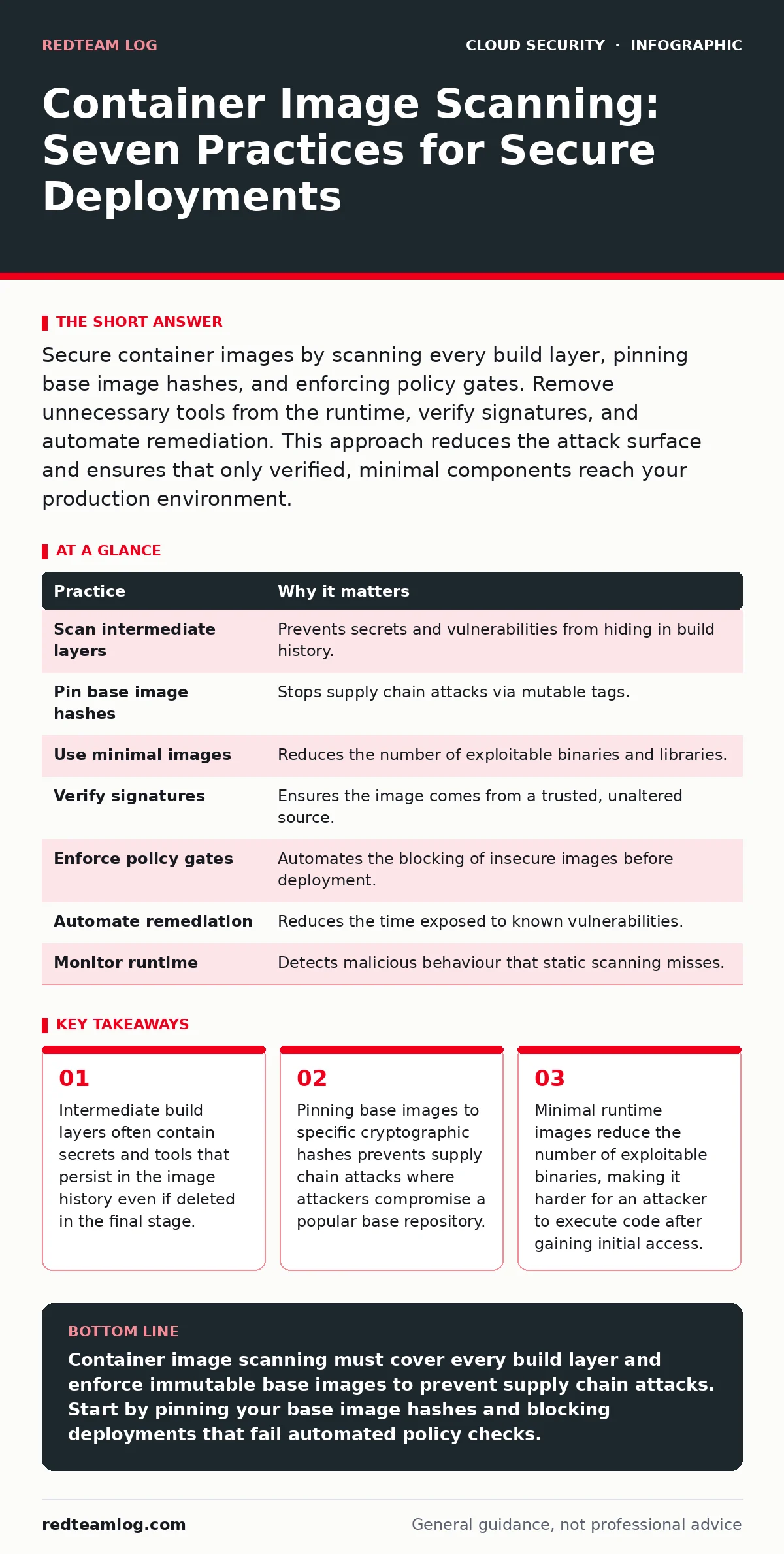
Secure container images by scanning every build layer, pinning base image hashes, and enforcing policy gates. Remove unnecessary tools from the runtime, verify signatures, and automate remediation. This approach reduces the attack surface and ensures that only verified, minimal components reach your production environment.
The Hidden Risks in Multi-Stage Builds
Container images are layered filesystems. Each instruction in your build file creates a new layer. Many teams assume that deleting sensitive files in a later stage removes them from the final image. This assumption is incorrect. The deleted files remain in the layer history. An attacker can extract the full history and retrieve secrets or private keys.
Imagine you compile a binary in one stage and copy it to a clean runtime image in the next. If you do not verify the intermediate layers, you leave a trail of exposed credentials. You must treat every layer as part of the attack surface.
1. Scan Every Intermediate Layer
Standard scanning tools often inspect only the final committed image. This leaves a blind spot. Vulnerabilities or secrets in intermediate layers are invisible to these scanners. You must configure your pipeline to scan every stage of the build process. This ensures that no sensitive data slips through the cracks during compilation or dependency resolution.
The reasoning is simple: if a layer contains a vulnerability, it is part of your software supply chain. You cannot guarantee security by ignoring parts of the build process.
Tip: Configure your CI/CD pipeline to fail the build if any intermediate layer contains high-severity vulnerabilities or hardcoded secrets, not just the final output.
2. Pin Base Images to Specific Hashes
Many teams pin base images to a tag like latest or ubuntu:22.04. Tags are mutable. An attacker who compromises a base image repository can push a malicious update to that tag. Your builds will then automatically include the malicious code. This is a common supply chain attack vector.
You need immutability. By using the specific cryptographic hash of the base image, you ensure that the exact same filesystem is used every time. This prevents subtle changes from entering your build without your knowledge.
Tip: Use tools that automatically rotate and pin base image hashes in your build configuration, ensuring you always use the verified, known-good version.
3. Enforce Minimal Runtime Images
Every binary in your container is a potential entry point. A full operating system image includes editors, debuggers, and network tools. An attacker who gains access to your container can use these tools to move laterally or exfiltrate data. You reduce risk by removing everything that is not strictly necessary for the application to run.
This aligns with the principle of least privilege. If the application does not need a shell, do not include one. If it does not need a package manager, remove it.
Tip: Use distroless images or alpine-based images that contain only the runtime dependencies for your application. Verify the contents with a manifest inspection tool before deployment.
4. Verify Image Signatures and Provenance
Trusting an image because it comes from a known registry is not enough. Attackers can register domain names similar to legitimate ones or compromise accounts. You need cryptographic proof that the image came from a trusted source and was not tampered with.
Signing images allows you to verify the publisher. Attestations provide evidence about how the image was built. This creates a chain of trust from the developer to the deployment environment. Without this, you are relying on the security of the registry provider alone.
Tip: Require that all images deployed to production have valid signatures and attestations linked to your internal build system. Reject any image that lacks this cryptographic proof.
See also: Confidential Computing: 6 Misconceptions That Compromise Security
5. Integrate Scanning into Policy Engines
Scanning is useless if the results are ignored. You must connect your scanning results to your admission control policy. This means that the decision to deploy an image is automated based on its security posture. Manual review is too slow and prone to error.
Policy engines allow you to define rules such as "no critical vulnerabilities" or "must be signed". When an image fails these checks, the deployment is blocked automatically. This enforces security standards consistently across all teams.
Tip: Use an admission controller that blocks pods from running if the associated image fails your defined security policies. This creates a hard stop for insecure deployments.
6. Automate Vulnerability Remediation
Finding vulnerabilities is only half the battle. You must fix them. Manual patching is slow and often forgotten. Automated remediation tools can generate pull requests to update vulnerable dependencies or rebuild images with patched base layers.
This reduces the time window during which your application is exposed. It also frees your developers from the burden of manual patch management. The goal is to keep the attack surface small and the fixes frequent.
Tip: Configure your scanning tool to automatically open merge requests for vulnerable dependencies. Review and merge these updates as part of your regular development workflow.
7. Monitor for Runtime Anomalies
Static scanning happens before deployment. It cannot detect issues that arise during execution. An image might be clean at build time but behave maliciously at runtime. This can happen if the application downloads additional components or if an attacker exploits a zero-day vulnerability.
Runtime security tools monitor system calls, file access, and network connections. They detect deviations from expected behaviour. This provides a second layer of defence that complements static scanning.
Tip: Deploy runtime security agents that alert on unexpected binary executions or network connections from your containers. Combine this with cloud firewalls to restrict traffic at the network level.
| Practice | Why it matters |
|---|---|
| Scan intermediate layers | Prevents secrets and vulnerabilities from hiding in build history. |
| Pin base image hashes | Stops supply chain attacks via mutable tags. |
| Use minimal images | Reduces the number of exploitable binaries and libraries. |
| Verify signatures | Ensures the image comes from a trusted, unaltered source. |
| Enforce policy gates | Automates the blocking of insecure images before deployment. |
| Automate remediation | Reduces the time exposed to known vulnerabilities. |
| Monitor runtime | Detects malicious behaviour that static scanning misses. |
Balancing Security with Speed
Security controls can slow down development. If scanning takes too long, developers will bypass it. You must optimise for speed. Use incremental scanning that only checks changed layers. Cache results to avoid redundant work.
However, do not compromise on critical checks. Blocking a deployment with a known critical vulnerability is better than fixing it after a breach. The cost of a breach far outweighs the delay in deployment.
Integrating with Broader Security
Container security does not exist in isolation. It connects to other parts of your infrastructure. For example, workload identity ensures that your containers have the minimum permissions needed to access cloud resources. This limits the damage if a container is compromised.
Similarly, immutable infrastructure practices mean you never patch running containers. You replace them with new, secure images. This aligns perfectly with container scanning, as every new image is verified before deployment.
Conclusion of Practices
Implementing these practices requires discipline. You must integrate them into your development workflow early. Start with scanning intermediate layers and pinning base images. Then add policy enforcement and runtime monitoring.
The goal is not perfect security, which is impossible. The goal is to make attacks difficult, detectable, and contained. By reducing the attack surface and verifying every component, you significantly lower your risk.
Key takeaways
- Intermediate build layers often contain secrets and tools that persist in the image history even if deleted in the final stage.
- Pinning base images to specific cryptographic hashes prevents supply chain attacks where attackers compromise a popular base repository.
- Minimal runtime images reduce the number of exploitable binaries, making it harder for an attacker to execute code after gaining initial access.
Container image scanning must cover every build layer and enforce immutable base images to prevent supply chain attacks. Start by pinning your base image hashes and blocking deployments that fail automated policy checks.
Frequently asked questions
How often should I scan container images?
Scan every time an image is built. Do not rely on periodic scans, as new vulnerabilities are discovered daily and new images are built frequently.
Can I scan images in a private registry?
Yes. Most scanning tools support private registries. Ensure your scanner has the necessary permissions to pull images from your private repository.
What is the difference between static and runtime scanning?
Static scanning checks the image file for known vulnerabilities and secrets before deployment. Runtime scanning monitors the running container for suspicious behaviour and anomalies.
Should I scan third-party images?
Yes. Third-party images are a common attack vector. Scan them just as rigorously as your own images and prefer verified, minimal images from trusted sources.
How this guide was produced: written by the RedTeam Log editorial team with AI assistance, checked against the public references listed below, and reviewed when the facts change. See our editorial policy or report an error.